Visual Prisma
Migration Safety
See migration state, schema drift, risk, and deployment readiness before you ship - a CLI + web dashboard for every Prisma project.
npx prisma-flowWhat you see in the first minute
PrismaFlow is built for fast operational clarity: detect the project, assess readiness, inspect the evidence, and export the result.
Project detection
Finds schema, migrations, provider, Prisma version, package manager, and DATABASE_URL state.
Live readiness
Combines connection, pending migrations, failed migrations, drift, and critical risks into one score.
Risk evidence
Highlights destructive SQL and explains what needs review before a deploy proceeds.
CI artifacts
Produces deterministic exit codes and JSON or Markdown reports for pull requests.
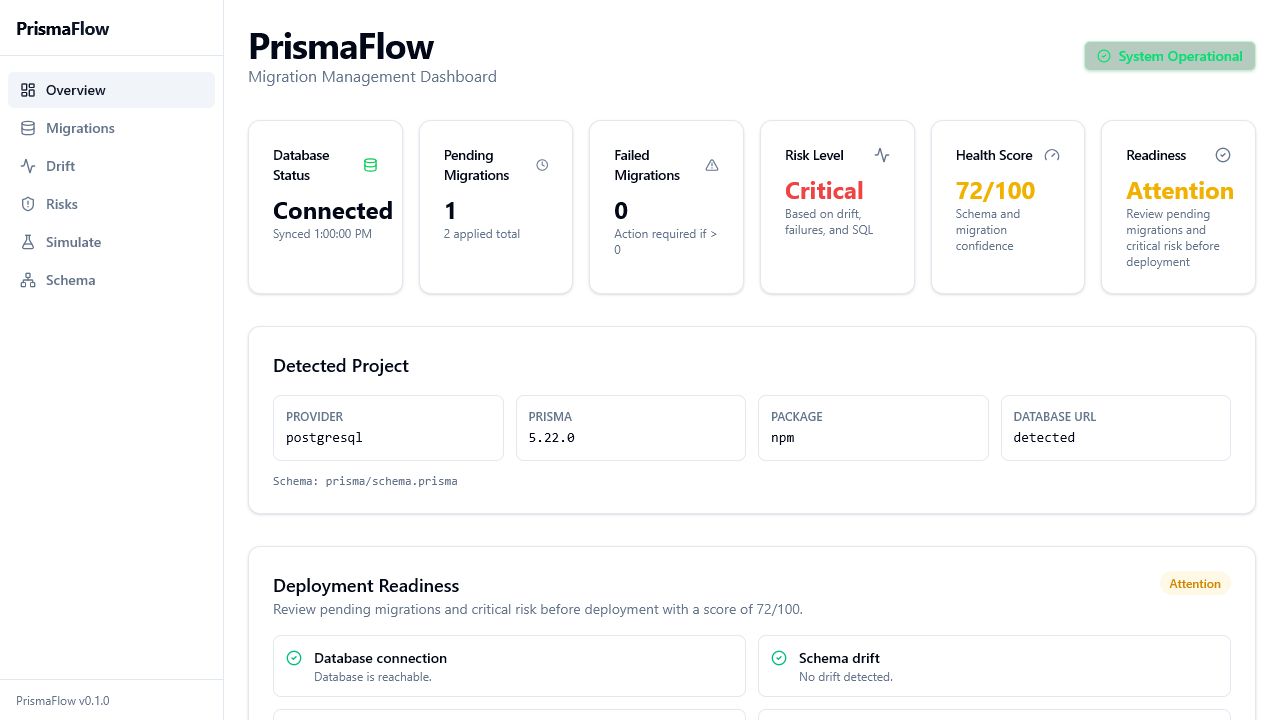
A real control surface for migration review
The dashboard turns raw Prisma state into scan-friendly project metadata, readiness checks, and deploy actions.
Everything V1 needs for Prisma migration confidence
From drift detection to schema exploration, PrismaFlow gives developers clear visibility into database changes before they hit production.
Schema Drift Detection
Compare your Prisma schema to the live database. Detect manual ALTER TABLE changes, orphaned indexes, and constraint mismatches before deploy.
Risk Analysis
Every migration is scanned for destructive operations — DROP TABLE, DROP COLUMN, TRUNCATE, bulk DELETE. Color-coded risk badges protect you from dangerous deploys.
Live Dashboard
A browser-based UI that auto-updates every few seconds. See connection status, pending/applied/failed migrations, and drift alerts at a glance.
Powerful CLI
Dashboard, status, check, report, doctor, inspect, simulate, and history commands give you control from the terminal. JSON output supports scripts and CI.
CI/CD Ready
Run prisma-flow check --ci in GitHub Actions, GitLab CI, or Jenkins. Structured exit codes (0-5) and JSON output integrate with any pipeline.
Secure by Default
Per-session 192-bit auth tokens, localhost-only CORS policy, execFile() child processes, and no cloud calls unless telemetry is explicitly enabled.
Schema Explorer
Browse Prisma models, fields, relations, enums, indexes, and constraints with an ERD-style overview built from your schema.
Migration Timeline
A visual timeline showing applied, pending, and failed migrations with timestamps, duration, and risk context.
Deployment Plan
A health score, go/no-go decision, blockers, and exact next commands summarize what to do before deploy.
Four steps to safe migrations
PrismaFlow wraps the Prisma CLI. Dashboard, status, check, and report flows are read-only by default.
Detect
PrismaFlow scans your project — finds the schema, discovers migrations, checks DATABASE_URL. Zero configuration needed.
Analyse
Runs prisma migrate status and prisma migrate diff under the hood. Parses SQL output to classify every difference and assign risk levels.
Visualise
Results are served via a local Hono API server and displayed in a Next.js dashboard with auto-refreshing status cards, timelines, and alerts.
Protect
Integrate with CI/CD using the check command. Block deploys when drift, failed migrations, or critical risks are detected.
Your Project Directory │ ▼┌────────────────────────────────────────┐│ prisma-flow CLI ││ ││ 1. Reads prisma/schema.prisma ││ 2. Runs prisma migrate status │ ◄── Prisma CLI│ 3. Runs prisma migrate diff ││ 4. Classifies drift & assigns risk ││ 5. Starts Hono HTTP server ││ • Per-session auth token ││ • Serves static dashboard ││ • Exposes /api/* REST endpoints │└──────────────────┬─────────────────────┘ │ http://localhost:5555 ▼┌────────────────────────────────────────┐│ Web Dashboard (Next.js) ││ ││ • Polls /api/status every 5 s ││ • Polls /api/migrations every 10 s ││ • Polls /api/drift every 15 s ││ • Renders live migration state ││ • Shows drift alerts w/ re-check btn │└────────────────────────────────────────┘Up and running in 30 seconds
No configuration files. No Prisma dependency changes. Just run the command from your project root.
Zero Install
Download and run in one command. Nothing persisted globally.
npx prisma-flowGlobal Install
Install once, use from any Prisma project on your machine.
npm install -g prisma-flowprisma-flowDev Dependency
Pin the version for your team. Add scripts to package.json.
npm install --save-dev prisma-flowRequirements: Node.js 20+, Prisma 5+, DATABASE_URL set in .env
Complete local CLI surface
The website now covers the full shipped command set: core dashboard and CI commands, analysis tools, and advanced local utilities.
prisma-flow(default)Launch the visual dashboard in your browser
prisma-flow statusPrint migration & drift state to the terminal
prisma-flow checkValidate state for CI/CD with structured exit codes (0-5)
prisma-flow planGenerate a deploy decision with blockers and next commands
prisma-flow reportGenerate a local JSON or Markdown report for reviews and CI artifacts
prisma-flow initCreate prismaflow.config.ts with documented defaults
prisma-flow doctorRun environment checks (Node, Prisma, DB, schema, migrations)
prisma-flow inspectInspect one migration with SQL, risk analysis, and simulation summary
prisma-flow simulatePreview migration statements and destructive warnings before execution
prisma-flow historyShow a terminal migration timeline with status and risk context
prisma-flow diffCompare the Prisma schema with a database URL
prisma-flow compareCompare configured environments for migration divergence
prisma-flow repairList drift repair suggestions and optionally apply safe steps
prisma-flow rollbackGenerate rollback SQL for a migration
CI/CD Integration — GitHub Actions
1name: Deploy2on:3 push:4 branches: [main]56jobs:7 migration-check:8 runs-on: ubuntu-latest9 steps:10 - uses: actions/checkout@v411 - uses: actions/setup-node@v412 with:13 node-version: '20.x'14 - run: npm ci15 - name: Build migration plan16 run: npx prisma-flow plan --ci --json17 env:18 DATABASE_URL: ${{ secrets.DATABASE_URL }}19 - name: Check migration state20 run: npx prisma-flow check --ci21 env:22 DATABASE_URL: ${{ secrets.DATABASE_URL }}23 - name: Generate report24 run: npx prisma-flow report --format markdown --output prismaflow-report.mdProgrammatic access to local migration state
The dashboard is powered by a token-protected local REST API. Use it from scripts, custom dashboards, or local monitors.
Endpoints
/api/statusProject & database health/api/planDeploy decision + next steps/api/migrationsPaginated migration list with risks/api/migrations/:nameSingle migration SQL + analysis/api/driftCurrent drift state (cached 10s)/api/drift/checkForce-refresh drift analysis/api/risksRisk score for all migrations/api/simulate/:nameMigration simulation result/api/schemaParsed models & enums1{2 "success": true,3 "data": {4 "connected": true,5 "migrationsApplied": 10,6 "migrationsPending": 2,7 "migrationsFailed": 0,8 "driftDetected": false,9 "driftCount": 0,10 "riskLevel": "low",11 "healthScore": 100,12 "deploymentReadiness": {13 "status": "ready",14 "score": 10015 },16 "provider": "postgresql",17 "lastSync": "2026-02-28T12:00:00Z"18 }19}V1 is free, local-first, and unlimited
No account, no cloud dependency, no artificial usage limits. PrismaFlow V1 focuses only on Prisma migration visibility and deployment confidence.
Open Source V1
Everything needed to understand and safely ship Prisma database changes.
- Unlimited local Prisma projects
- Visual migration timeline
- Drift detection with explanations
- Risk analysis and recommendations
- Migration simulation
- Schema explorer and ERD-style overview
- Health score and deployment readiness
- Deployment plan with next commands
- Reports and CI integration
Ready to ship migrations safely?
Get started in under a minute. No sign-up required.
npx prisma-flow